Working with AI agents
OpenPipeline includes an MCP server. It lets an AI agent such as Claude read your dbt project and propose changes. An agent can look at everything, but it can only propose edits. Nothing is written to your dbt files until a person accepts.
Connect an agent
claude mcp add openpipeline -- openpipeline mcp /path/to/dbt/project
Check it with claude mcp list. If you installed with uvx, use
-- uvx openpipeline mcp /path/to/dbt/project.
Most MCP clients take a JSON config like this:
{
  "mcpServers": {
    "openpipeline": {
      "command": "openpipeline",
      "args": ["mcp", "/path/to/dbt/project"]
    }
  }
}
Run the server as a service, then give your client the URL:
openpipeline mcp /path/to/dbt/project --transport streamable-http
# listening on http://127.0.0.1:8485/mcp
With Docker Compose, the mcp service already does this on port 8485.
On a loopback address the endpoint is open. On any other address (including
Docker and Compose) it needs Authorization: Bearer <token>; set --token or
OPENPIPELINE_TOKEN, or read the generated one from the startup output. The
stdio setup above is local-only and needs no token. Agents can only propose
either way. See Write access and security.
Tip
Run openpipeline serve on the same project at the same time. Agents file
proposals and you review them in the web UI.
The propose, review, accept loop
- The agent reads. It calls
explainto understand a model,impact_ofto see what depends on it,column_lineagebefore it touches a column, andlist_rulesto learn which business rules exist. - The agent checks its work. It calls
preview_changewith the new file contents. This is a dry run. It reports new warnings and the models that would be affected, so the agent can fix mistakes before you see them. - The agent proposes. It calls
propose_change. The proposal appears in the Proposals tab with a plain-English summary and a readable diff for each file. -
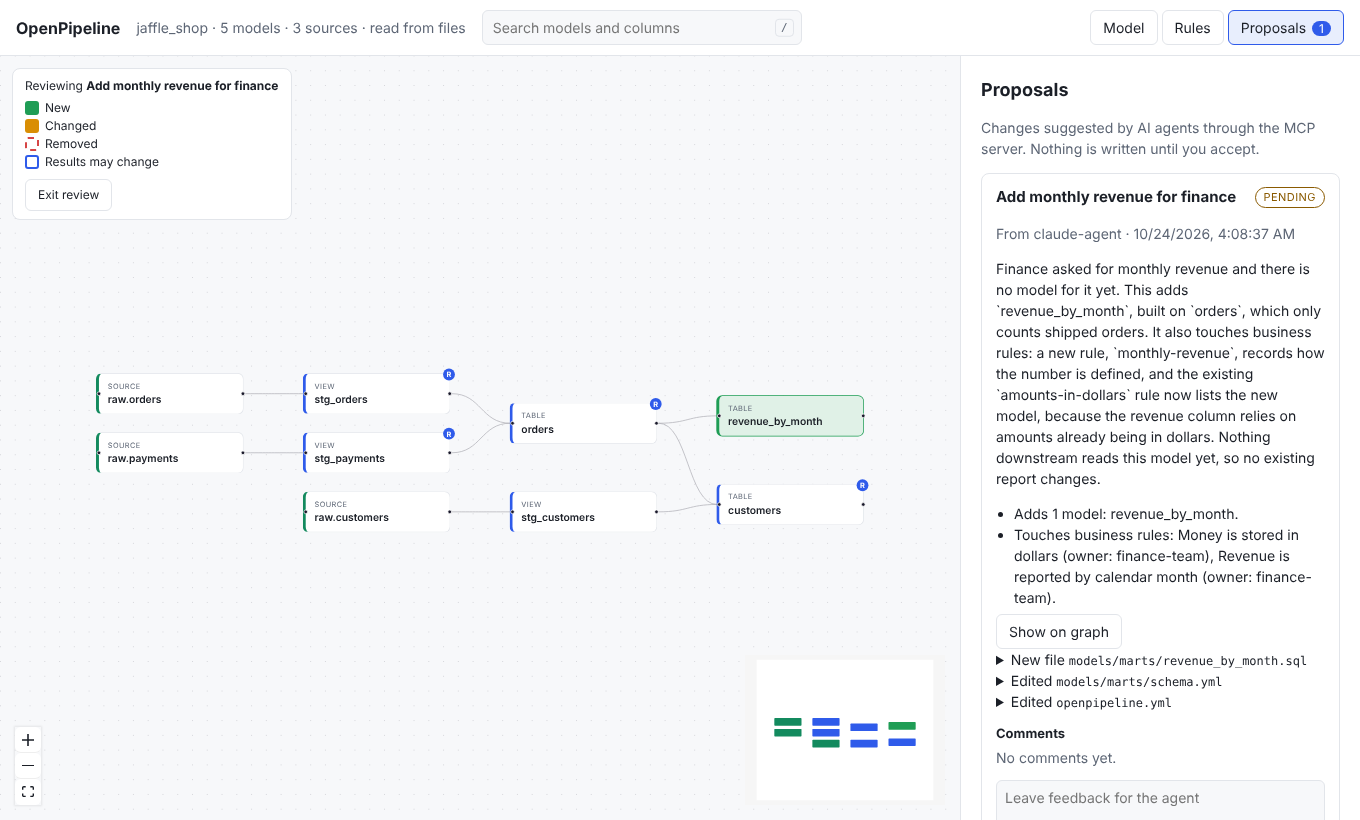
You review. Press Show on graph to see the result: new models in green, changed models in amber, removed models as red dashed ghosts, and models whose results may change with an outline. Click any box to read its story.
-
You decide. Press Accept and write files, or Reject with a reason. You can also leave comments. The agent reads them with
get_proposal. - The agent revises. If you asked for changes, it calls
propose_changeagain withrevisesset to the old proposal. The old one is marked superseded.
If someone edits a file after a proposal was made, accepting shows which files changed. You can then choose Accept anyway.
Proposals are plain JSON files in .openpipeline/proposals inside your project,
so you can read, commit, or delete them by hand.
The one rule
There is no tool that writes to your dbt files. The only way a file changes is a person pressing Accept (or Save, when editing a description in the UI).
Tool reference
| Tool | What it does | Arguments |
|---|---|---|
list_models |
Every model with its description, owner, and path. | none |
get_model |
A model's SQL, columns, config, direct dependencies, and rules. | name |
explain |
The plain-English story of a model, step by step. | name |
impact_of |
Models upstream of, and affected downstream by, a model. | name |
list_rules |
The business rules and who owns them. | none |
search |
Find models, sources, seeds, and columns by name or description. | query, limit |
column_lineage |
Which columns a column is built from, and which use it. Call it before renaming or removing a column. | model, column |
sample_rows |
A few rows of a model, run on local sample data. Never touches the warehouse. | name, limit |
preview_change |
Dry run of a change: summary, added, changed, removed, affected, warnings. Saves nothing. | files |
propose_change |
File a proposal for a person to review. | title, rationale, files, author, revises |
propose_docs |
Propose a new model description or column descriptions. | model, description, columns, rationale, author |
list_glossary |
The business's labels and definitions for models and columns. | none |
propose_glossary_term |
Propose a glossary term (or a better label or definition) as an edit to openpipeline.yml. See business words. |
name, label, definition, rationale, author |
get_proposal |
A proposal's status and the comments people left on it. Poll after proposing. | id |
list_proposals |
All proposals and whether each is pending, accepted, rejected, or superseded. | none |
Defaults: limit is 10 for sample_rows (up to 200) and 20 for search, and
author is agent. get_proposal and list_proposals report status as
pending, accepted, rejected, or superseded.
files is always a list of {"path": "...", "content": "..."} with the full
new content of each file, relative to the project root. Empty content deletes the
file. Paths outside the project, or inside .git or .openpipeline, are
refused.
Writing good proposals
Tell your agent to:
- explain why in the rationale, in plain words a business reader understands,
- name every business rule the change touches,
- run
preview_changefirst and fix its warnings, and - call
column_lineagebefore changing a column.
The demo shows what a good proposal looks like.